As for Level 1, for each character of the game you need to add, follow the steps below:
- Tool Palette->Supplement->TImage
- Object Inspector->Properties->Miscellaneous->Name->ImageHero1
- Object Inspector->Properties->Miscellaneous->Transparent->True
- Object Inspector->Properties->Localizable->Picture->Load->hero1.bmp
- Object Inspector->Properties->Layout->Autosize->True
To go faster you can use copy/paste to create the subsequent characters and just modify the picture and the name.
Monday, October 02, 2006


Winning level 1
And here the code when successfully boarding the plane; and going to the next level after 3 successful attempts:
// -----------------------------
// Win Game - Level 1
// -----------------------------
// Board plane - 1st and 2nd time
if ((PosChar=11) and (Row<>2)) then begin
Cntrls:=false;
StopAllTimers;
Row:=Row+1;
SetupGame;
TimerLevel1.Enabled:=true;
end;
// Board plane - 3rd time - Go to level 2
if ((PosChar=11) and (Row=2)) then begin
Cntrls:=false;
StopAllTimers;
Row:=0;
Mode:=2;
SetupGame;
TimerLevel2.Interval:=400;
TimerLevel2.Enabled:=true;
end;
// -----------------------------
// Win Game - Level 1
// -----------------------------
// Board plane - 1st and 2nd time
if ((PosChar=11) and (Row<>2)) then begin
Cntrls:=false;
StopAllTimers;
Row:=Row+1;
SetupGame;
TimerLevel1.Enabled:=true;
end;
// Board plane - 3rd time - Go to level 2
if ((PosChar=11) and (Row=2)) then begin
Cntrls:=false;
StopAllTimers;
Row:=0;
Mode:=2;
SetupGame;
TimerLevel2.Interval:=400;
TimerLevel2.Enabled:=true;
end;
Killed by a Bomb and Game Over
Then lets code what happens when the main character is hit by a bomb; and after 3 miss the Game is Over:
// Killed by bomb A
if ((BombAPos=5) and (PosChar=0)) or
((BombAPos=5) and (PosChar=1)) or
((BombAPos=4) and (PosChar=4)) or
((BombAPos=3) and (PosChar=7)) or
// Killed by bomb B
((BombBPos=5) and (PosChar=2)) or
((BombBPos=4) and (PosChar=5)) or
((BombBPos=3) and (PosChar=8)) or
// Killed by bomb C
((BombCPos=5) and (PosChar=3)) or
((BombCPos=4) and (PosChar=6)) or
((BombCPos=3) and (PosChar=9)) or
((BombCPos=2) and (PosChar=10)) then begin
Cntrls:=false;
Blocked:=true;
StopAllTimers;
CicloTimer:=1;
TimerBombMiss.interval:=500;
TimerBombMiss.Enabled:=true;
PlaySound(pfMiss);
end;
And the animated sequence:
case CicloTimer
of 1: begin ArrayMan[PosChar].visible:=(not ArrayMan[PosChar].visible); end;
2: begin ArrayMan[PosChar].visible:=(not ArrayMan[PosChar].visible); end;
3: begin ArrayMan[PosChar].visible:=(not ArrayMan[PosChar].visible); end;
4: begin ArrayMan[PosChar].visible:=(not ArrayMan[PosChar].visible); end;
5: begin TimerBombMiss.Enabled:=false; Life:=Life-1;
// -----------------------------
// Game Over - Level 1
// -----------------------------
case Life // Life indicator display
of 2: begin ImageLife2.visible:=false; end;
1: begin ImageLife3.visible:=false; end;
end;
// Game Over
if Life=0 then begin
Cntrls:=false;
StopAllTimers;
PlaySound(pfEnd);
Select:=0;
bStart:=false;
end;
if Life<>0 then begin SetupGame; TimerLevel1.Enabled:=true; end;
end;
end;
Inc(CicloTimer);
// Killed by bomb A
if ((BombAPos=5) and (PosChar=0)) or
((BombAPos=5) and (PosChar=1)) or
((BombAPos=4) and (PosChar=4)) or
((BombAPos=3) and (PosChar=7)) or
// Killed by bomb B
((BombBPos=5) and (PosChar=2)) or
((BombBPos=4) and (PosChar=5)) or
((BombBPos=3) and (PosChar=8)) or
// Killed by bomb C
((BombCPos=5) and (PosChar=3)) or
((BombCPos=4) and (PosChar=6)) or
((BombCPos=3) and (PosChar=9)) or
((BombCPos=2) and (PosChar=10)) then begin
Cntrls:=false;
Blocked:=true;
StopAllTimers;
CicloTimer:=1;
TimerBombMiss.interval:=500;
TimerBombMiss.Enabled:=true;
PlaySound(pfMiss);
end;
And the animated sequence:
case CicloTimer
of 1: begin ArrayMan[PosChar].visible:=(not ArrayMan[PosChar].visible); end;
2: begin ArrayMan[PosChar].visible:=(not ArrayMan[PosChar].visible); end;
3: begin ArrayMan[PosChar].visible:=(not ArrayMan[PosChar].visible); end;
4: begin ArrayMan[PosChar].visible:=(not ArrayMan[PosChar].visible); end;
5: begin TimerBombMiss.Enabled:=false; Life:=Life-1;
// -----------------------------
// Game Over - Level 1
// -----------------------------
case Life // Life indicator display
of 2: begin ImageLife2.visible:=false; end;
1: begin ImageLife3.visible:=false; end;
end;
// Game Over
if Life=0 then begin
Cntrls:=false;
StopAllTimers;
PlaySound(pfEnd);
Select:=0;
bStart:=false;
end;
if Life<>0 then begin SetupGame; TimerLevel1.Enabled:=true; end;
end;
end;
Inc(CicloTimer);
Bomb hits a Vehicle
Then, lets add the event when a bomb hits a vehicle and disappears:
// Bomb A hits a vehicle
if ((BombAPos=3) and (PolicePos=2)) or
((BombAPos=4) and (ArmyPos=4)) or
((BombAPos=5) and (AmbulancePos=3)) then begin
begin for cicloX:=1 to 4 do ArrayBombA[cicloX].visible:=false; end;
BombAPos:=0;
PlaySound(pfEvent);
end;
// Bomb B hits a vehicle
if ((BombBPos=3) and (PolicePos=3)) or
((BombBPos=4) and (ArmyPos=3)) or
((BombBPos=5) and (AmbulancePos=3)) then begin
begin for cicloX:=1 to 4 do ArrayBombB[cicloX].visible:=false; end;
BombBPos:=0;
PlaySound(pfEvent);
end;
// Bomb C hits a vehicle
if ((BombCPos=3) and (PolicePos=4)) or
((BombCPos=4) and (ArmyPos=3)) or
((BombCPos=5) and (AmbulancePos=4)) then begin
begin for cicloX:=1 to 4 do ArrayBombC[cicloX].visible:=false; end;
BombCPos:=0;
PlaySound(pfEvent);
end;
// Bomb A hits a vehicle
if ((BombAPos=3) and (PolicePos=2)) or
((BombAPos=4) and (ArmyPos=4)) or
((BombAPos=5) and (AmbulancePos=3)) then begin
begin for cicloX:=1 to 4 do ArrayBombA[cicloX].visible:=false; end;
BombAPos:=0;
PlaySound(pfEvent);
end;
// Bomb B hits a vehicle
if ((BombBPos=3) and (PolicePos=3)) or
((BombBPos=4) and (ArmyPos=3)) or
((BombBPos=5) and (AmbulancePos=3)) then begin
begin for cicloX:=1 to 4 do ArrayBombB[cicloX].visible:=false; end;
BombBPos:=0;
PlaySound(pfEvent);
end;
// Bomb C hits a vehicle
if ((BombCPos=3) and (PolicePos=4)) or
((BombCPos=4) and (ArmyPos=3)) or
((BombCPos=5) and (AmbulancePos=4)) then begin
begin for cicloX:=1 to 4 do ArrayBombC[cicloX].visible:=false; end;
BombCPos:=0;
PlaySound(pfEvent);
end;
Terrorist throwing Bombs
Then let's code the vehicles movements routine and a random event routine when those vehicles happen to appear.
Here is the code for the terrorist and bombs' movements:
// Movement - bomb A
case BombAPos
of 6: begin BombAPos:=0; ImageBombA4.Visible:=false; end;
5: begin BombAPos:=6; ImageBombA3.Visible:=false; PlaySound(pfEvent); ImageBombA4.Visible:=true; end;
4: begin BombAPos:=5; ImageBombA2.Visible:=false; ImageBombA3.Visible:=true; end;
3: begin BombAPos:=4; ImageBombA1.Visible:=false; ImageBombA2.Visible:=true; end;
2: begin BombAPos:=3; ImageBomberA.Visible:=false; ImageBombA1.Visible:=true; end;
1: begin BombAPos:=2; ImageBomberA.Visible:=true; end;
end;
// Movement - bomb B
case BombBPos
of 6: begin BombBPos:=0; ImageBombB4.Visible:=false; end;
5: begin BombBPos:=6; ImageBombB3.Visible:=false; PlaySound(pfEvent); ImageBombB4.Visible:=true; end;
4: begin BombBPos:=5; ImageBombB2.Visible:=false; ImageBombB3.Visible:=true; end;
3: begin BombBPos:=4; ImageBombB1.Visible:=false; ImageBombB2.Visible:=true; end;
2: begin BombBPos:=3; ImageBomberB.Visible:=false; ImageBombB1.Visible:=true; end;
1: begin BombBPos:=2; ImageBomberB.Visible:=true; end;
end;
// Movement - bomb C
case BombCPos
of 6: begin BombCPos:=0; ImageBombC4.Visible:=false; end;
5: begin BombCPos:=6; ImageBombC3.Visible:=false; PlaySound(pfEvent); ImageBombC4.Visible:=true; end;
4: begin BombCPos:=5; ImageBombC2.Visible:=false; ImageBombC3.Visible:=true; end;
3: begin BombCPos:=4; ImageBombC1.Visible:=false; ImageBombC2.Visible:=true; end;
2: begin BombCPos:=3; ImageBomberC.Visible:=false; ImageBombC1.Visible:=true; end;
1: begin BombCPos:=2; ImageBomberC.Visible:=true; end;
end;
And here is the random events:
// Event - Bombs appear
if RdmEvent=3 then begin // Event - Bomb A
if BombAPos=0 then begin BombAPos:=1; end;
end;
if RdmEvent=4 then begin // Event - Bomb B
if BombBPos=0 then begin BombBPos:=1; end;
end;
if RdmEvent=5 then begin // Event- Bomb C
if BombCPos=0 then begin BombCPos:=1; end;
end;
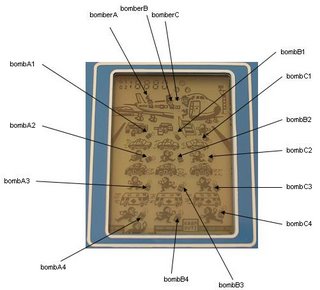
Here is the code for the terrorist and bombs' movements:
// Movement - bomb A
case BombAPos
of 6: begin BombAPos:=0; ImageBombA4.Visible:=false; end;
5: begin BombAPos:=6; ImageBombA3.Visible:=false; PlaySound(pfEvent); ImageBombA4.Visible:=true; end;
4: begin BombAPos:=5; ImageBombA2.Visible:=false; ImageBombA3.Visible:=true; end;
3: begin BombAPos:=4; ImageBombA1.Visible:=false; ImageBombA2.Visible:=true; end;
2: begin BombAPos:=3; ImageBomberA.Visible:=false; ImageBombA1.Visible:=true; end;
1: begin BombAPos:=2; ImageBomberA.Visible:=true; end;
end;
// Movement - bomb B
case BombBPos
of 6: begin BombBPos:=0; ImageBombB4.Visible:=false; end;
5: begin BombBPos:=6; ImageBombB3.Visible:=false; PlaySound(pfEvent); ImageBombB4.Visible:=true; end;
4: begin BombBPos:=5; ImageBombB2.Visible:=false; ImageBombB3.Visible:=true; end;
3: begin BombBPos:=4; ImageBombB1.Visible:=false; ImageBombB2.Visible:=true; end;
2: begin BombBPos:=3; ImageBomberB.Visible:=false; ImageBombB1.Visible:=true; end;
1: begin BombBPos:=2; ImageBomberB.Visible:=true; end;
end;
// Movement - bomb C
case BombCPos
of 6: begin BombCPos:=0; ImageBombC4.Visible:=false; end;
5: begin BombCPos:=6; ImageBombC3.Visible:=false; PlaySound(pfEvent); ImageBombC4.Visible:=true; end;
4: begin BombCPos:=5; ImageBombC2.Visible:=false; ImageBombC3.Visible:=true; end;
3: begin BombCPos:=4; ImageBombC1.Visible:=false; ImageBombC2.Visible:=true; end;
2: begin BombCPos:=3; ImageBomberC.Visible:=false; ImageBombC1.Visible:=true; end;
1: begin BombCPos:=2; ImageBomberC.Visible:=true; end;
end;
And here is the random events:
// Event - Bombs appear
if RdmEvent=3 then begin // Event - Bomb A
if BombAPos=0 then begin BombAPos:=1; end;
end;
if RdmEvent=4 then begin // Event - Bomb B
if BombBPos=0 then begin BombBPos:=1; end;
end;
if RdmEvent=5 then begin // Event- Bomb C
if BombCPos=0 then begin BombCPos:=1; end;
end;

Vehicles' Movements
Then let's code the vehicles movements routine and a random event routine when those vehicles happen to appear.
Here is the code for the different vehicles' movements:
// Movement - ambulance
case AmbulancePos
of 4: begin AmbulancePos:=0; ImageAmbulance3.Visible:=false; end;
3: begin AmbulancePos:=4; ImageAmbulance2.Visible:=false; ImageAmbulance3.Visible:=true; end;
2: begin AmbulancePos:=3; ImageAmbulance1.Visible:=false; ImageAmbulance2.Visible:=true; end;
1: begin AmbulancePos:=2; ImageAmbulance1.Visible:=true; end;
end;
// Movement - police car
case PolicePos
of 4: begin PolicePos:=0; ImagePolice3.Visible:=false; end;
3: begin PolicePos:=4; ImagePolice2.Visible:=false; ImagePolice3.Visible:=true; end;
2: begin PolicePos:=3; ImagePolice1.Visible:=false; ImagePolice2.Visible:=true; end;
1: begin PolicePos:=2; ImagePolice1.Visible:=true; end;
end;
// Movement - army car
case ArmyPos
of 4: begin ArmyPos:=0; ImageArmy3.Visible:=false; end;
3: begin ArmyPos:=4; ImageArmy2.Visible:=false; ImageArmy3.Visible:=true; end;
2: begin ArmyPos:=3; ImageArmy1.Visible:=false; ImageArmy2.Visible:=true; end;
1: begin ArmyPos:=2; ImageArmy1.Visible:=true; end;
end;
And here is the code for the random events:
RdmEvent:=random(12); // Random event calculation
// Event - Cars appear
if RdmEvent=0 then begin // Event - ambulance
if AmbulancePos=0 then begin AmbulancePos:=1;
end;
end;
if RdmEvent=1 then begin // Event - police car
if PolicePos=0 then begin PolicePos:=1;
end;
end;
if RdmEvent=2 then begin // Event - army car
if ArmyPos=0 then begin ArmyPos:=1;
end;
end;
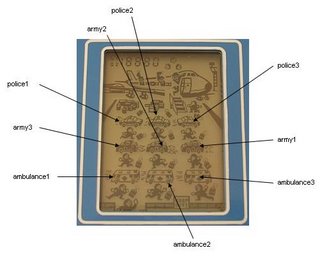
Here is the code for the different vehicles' movements:
// Movement - ambulance
case AmbulancePos
of 4: begin AmbulancePos:=0; ImageAmbulance3.Visible:=false; end;
3: begin AmbulancePos:=4; ImageAmbulance2.Visible:=false; ImageAmbulance3.Visible:=true; end;
2: begin AmbulancePos:=3; ImageAmbulance1.Visible:=false; ImageAmbulance2.Visible:=true; end;
1: begin AmbulancePos:=2; ImageAmbulance1.Visible:=true; end;
end;
// Movement - police car
case PolicePos
of 4: begin PolicePos:=0; ImagePolice3.Visible:=false; end;
3: begin PolicePos:=4; ImagePolice2.Visible:=false; ImagePolice3.Visible:=true; end;
2: begin PolicePos:=3; ImagePolice1.Visible:=false; ImagePolice2.Visible:=true; end;
1: begin PolicePos:=2; ImagePolice1.Visible:=true; end;
end;
// Movement - army car
case ArmyPos
of 4: begin ArmyPos:=0; ImageArmy3.Visible:=false; end;
3: begin ArmyPos:=4; ImageArmy2.Visible:=false; ImageArmy3.Visible:=true; end;
2: begin ArmyPos:=3; ImageArmy1.Visible:=false; ImageArmy2.Visible:=true; end;
1: begin ArmyPos:=2; ImageArmy1.Visible:=true; end;
end;
And here is the code for the random events:
RdmEvent:=random(12); // Random event calculation
// Event - Cars appear
if RdmEvent=0 then begin // Event - ambulance
if AmbulancePos=0 then begin AmbulancePos:=1;
end;
end;
if RdmEvent=1 then begin // Event - police car
if PolicePos=0 then begin PolicePos:=1;
end;
end;
if RdmEvent=2 then begin // Event - army car
if ArmyPos=0 then begin ArmyPos:=1;
end;
end;

Subscribe to:
Posts (Atom)